Search for "client portal for social media agency" and you'll get a page of feature lists. White-label domains, approval links, analytics widgets, Kanban boards. They tell you what a portal can show. Almost none of them tell you what it should show, and that's the decision that makes or breaks the thing.
I've run a social media agency in India across 63+ brands, and I've made this mistake both ways. Show the client too little and they go back to asking "status?" on WhatsApp. Show them too much and they start managing your designer, commenting on a half-made reel at 11 PM and asking why a post moved from Tuesday to Thursday. A portal is not a window into your agency. It's a counter where the client collects finished work and makes decisions.
What is a client portal for a social media agency?
It's a separate, client-only view of the work you do for one brand: the posts to approve, the calendar, results and billing. The client logs in (or opens a link) and sees their brand and nothing else. Your team keeps working in its own workspace; the portal shows the client a filtered, finished version of the same data.
The key word is filtered. If your portal is just your project board with the client added as a guest, you don't have a portal. You have a client inside your kitchen.
What should clients see in the portal?
Our rule: if the client can't act on it, decide on it, or use it to trust you more, it doesn't go in. That leaves six things.
- Posts ready for approval. The finished creative with its caption, hashtags and posting date, plus two buttons: approve, or ask for changes. This is the reason the portal exists.
- The calendar. Every post for the month on its posting date, with a simple status: for review, approved, scheduled, posted. Clients love seeing the month filled in. It's proof of work at a glance.
- One comment thread per post. Feedback attached to the post it's about, with room for a screenshot or a marked-up image. Not a general chat.
- What went live, and how it did. Yesterday's and today's posts, and the reach and engagement numbers. This is what makes the monthly report a formality instead of a surprise.
- Invoices and a way to pay. The brand's bills, what's due, and a pay button. In India that means UPI and cards, and ideally part-payments, because plenty of small businesses pay a retainer in two goes.
- Who to call. Their account lead's name with a WhatsApp and email button. Clients relax when they know exactly who owns their account.
What should stay off the client's screen?
This is the part the feature lists skip. Here's the visibility map we settled on after a few bruises:
| Item | Client sees it? | Why |
|---|---|---|
| Finished post sent for review | Yes | It's a decision only they can make |
| Drafts and work in progress | No | Early feedback on unfinished work doubles your revisions |
| Planned topics for the month | Optional, read-only | Useful for clients who want to see the plan; approval still happens on the finished post |
| Internal comments between designer and manager | No | "This brief makes no sense" is a normal team conversation, not a client one |
| Who made the post and their due dates | No | The client hired the agency, not a person; individual delays are your problem to manage |
| Other brands you handle | Never | Confidentiality, and competing clients exist in every city |
| Hours spent, costs, margins | No (unless you bill hourly) | On a fixed retainer, hours invite haggling over the wrong thing |
| Posting results | Yes | Proof the work is doing its job |
| Invoices and payment status | Yes | Fewer "please resend the bill" messages |
Even the tools built for this default to hiding unfinished work. Vista Social, for example, advises leaving cross-stage visibility off so a client only sees posts once they reach the client review step, and checking the external view in a private window before you send it.
Approval link or a proper login?
There are two ways to put work in front of a client. Many schedulers send a review link: SocialPilot's client portal, for example, lets clients approve, reject and comment with no login. Others give the client an account.
Links are great for a one-off campaign or a client who reviews twice a month. For a retainer client you'll work with for a year, I prefer a login, for three reasons:
- It remembers. The client sees last month's posts, old comments and paid invoices in one place, instead of hunting through forwarded links.
- Several people, one record. When the owner, the marketing manager and the owner's son all review (common in Indian family businesses), each person's approval and comment is on record under their own name.
- Notifications. A login on the phone can send a push alert when posts are waiting, which matters more than any feature inside the portal.
If clients will open it on their phone (they will), it should install from the browser like an app. We explain the trade-offs in PWA vs native app for client portals, and if you want your own logo and domain on it, read our white-label client portal guide before paying extra for it.
Should clients see the content plan before posts are made?
It depends on the client. A restaurant owner who just wants the posts to go out doesn't need to read thirty topics on the 1st. A school or a hospital, where every word gets checked, often does want to see the topics and captions before the designer starts.
What I'd avoid is approving twice. If the client sees the plan, make it read-only and say clearly that approval happens on the finished post. Otherwise you get approval of the idea, then a fresh round of changes on the creative, and your designer does the work twice. If you're already stuck in that loop, our guide on handling client revisions has the scripts.
How our own client portal is set up
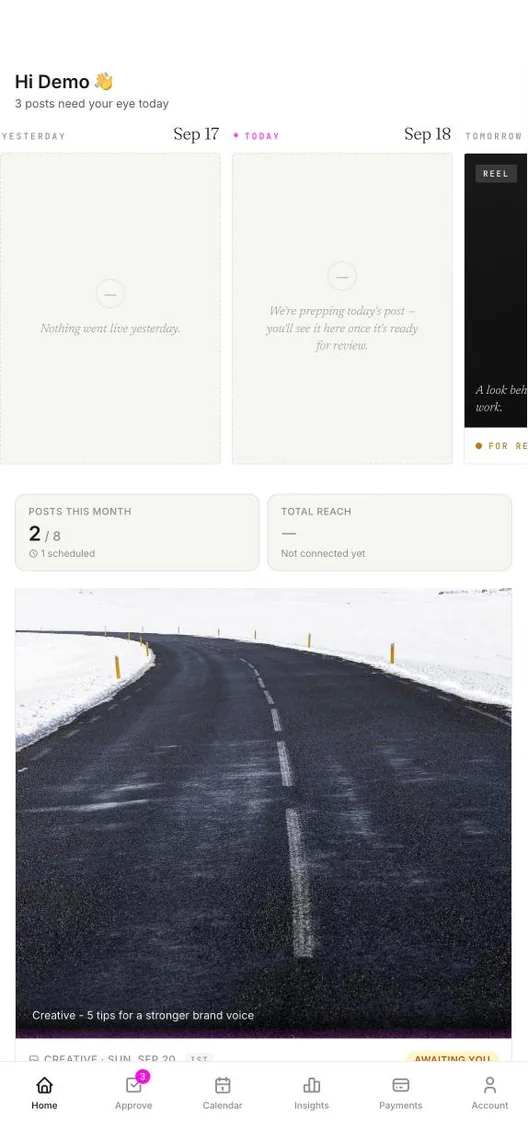
We built the portal in My Digital Sevak around that visibility map, because we use it for our own clients every day. Here's what a brand sees:
- A post appears only once the team sends it for client review. Drafts and posts still being made aren't shown, unless you switch on the read-only Plan view for that brand, which shows upcoming posts marked "Planned" or "Being made".
- Approve, or ask for changes with quick presets (Change copy, Fix design, Reshoot/redo, Adjust hashtags, Reschedule). Clients can approve several posts in one go.
- A comment thread on each post, where the client can type and attach up to six images. The team's own task comments stay on the staff side.
- A Yesterday / Today / Tomorrow strip on the home screen, a calendar, and an insights tab with the brand's results.
- Invoices with Razorpay payment by UPI or card, including part-payments.
- One login for a person who runs several brands, with a switcher, and push notifications when posts are waiting.
The honest limits: clients type comments and attach images; there are no voice notes. Instagram Stories don't go through the portal, because we don't ask clients to approve stories. And the portal is for approvals and visibility, not a full chat app. We still use WhatsApp to nudge, as we explain in WhatsApp vs client portal. The approval flow itself is described on the client approval app page.
A launch checklist for your client portal
The software is the easy part. Getting a 55-year-old business owner in Dehradun or Ludhiana to use it is the real work. This is what worked for us:
- Decide your visibility map first. Use the table above. Write it into your SOP so nobody on the team adds a client as a guest on the internal board "just this once".
- Install it with them, on their phone. Do it on the onboarding call or the first meeting. A login emailed later gets forgotten.
- Turn on notifications in the same sitting. The alert is what brings them back.
- Send the first batch through the portal only. Not on WhatsApp "as well". If you post it in both places, they'll answer on WhatsApp.
- Reply to WhatsApp feedback with a portal link. Politely, every time, for the first month: "Got it, noted on the post here."
- Add every reviewer. If the owner's brother also approves, give him his own login. Shared passwords mean you can't tell who approved what.
- Review after 30 days. Is the client approving inside the portal? If not, ask why, and fix that one thing.
Agencies that run several brands from one team will find the full weekly rhythm in how to manage multiple social media clients. And if you're an agency in a smaller city competing with bigger names, a clean portal is one of the cheapest ways to look established. See how agencies in Dehradun and other cities position themselves.
Frequently asked questions
What should a social media agency's client portal include?
Finished posts waiting for approval, with a way to approve or ask for changes; the month's calendar; one comment thread per post; what went live and how it performed; and the brand's invoices with a way to pay. Anything the client cannot act on or does not need to know can stay inside the agency.
Should clients see drafts in the client portal?
No. Show a post only once your own team has reviewed it and marked it ready for the client. Half-made drafts invite early feedback on work that was never meant to be final, and they make your team look slower than it is. A read-only plan of upcoming topics is a different thing and can work well.
Is a client portal better than WhatsApp for client approvals?
For approvals, yes. In a portal every post has one status and one comment thread, so nothing gets lost in a chat. WhatsApp is still the fastest way to tell a client something is waiting, so most Indian agencies use WhatsApp to nudge and the portal to decide.
Sources checked on 25 November 2026: Vista Social's "Client Portal for Agencies" guide (October 2026) on client-only review visibility; SocialPilot's agency guide on fixing the approval bottleneck, for its no-login client portal. Product details describe My Digital Sevak as of November 2026.
Give clients a counter, not a key to the kitchen
A mobile client portal where brands approve finished posts, follow the calendar, see results and pay invoices, connected to the agency workspace your team already works in. From ₹999/month. Try it free for 3 days, no card needed, with a 7-day money-back guarantee.