Why do agencies need a client approval app?
Because WhatsApp was never built for approvals. I run Advance Media Solution, and our team handles more than 60 brands on My Digital Sevak. Before we built the client app, a typical approval went like this: export the reel, send it on WhatsApp, wait, get a thumbs-up emoji from someone at the brand, and then argue three weeks later about whether that emoji meant "approved" or "seen". Feedback sat in voice notes nobody could find. Revisions went out on the wrong version.
A content approval app fixes the record-keeping. Every post has one place where the client says yes or asks for changes, and that answer stays attached to the post, with the date, the person and the version they looked at. Your team stops guessing what is approved, and the client stops scrolling through a chat to find last Tuesday's creative.
What your client sees
The client app opens on today. Yesterday's post, today's post and tomorrow's sit side by side, with a line telling them how many posts need their eye. Below that are their tabs:
- Approve: every post waiting on them, with caption, format and planned date shown in IST
- Calendar: the whole month, so they can see what is coming instead of asking
- Insights: performance numbers and their monthly reports, with PDF links
- Payments: open invoices, full GST invoice view and a Pay button
- Account: their brand team, your team's contacts and notification settings
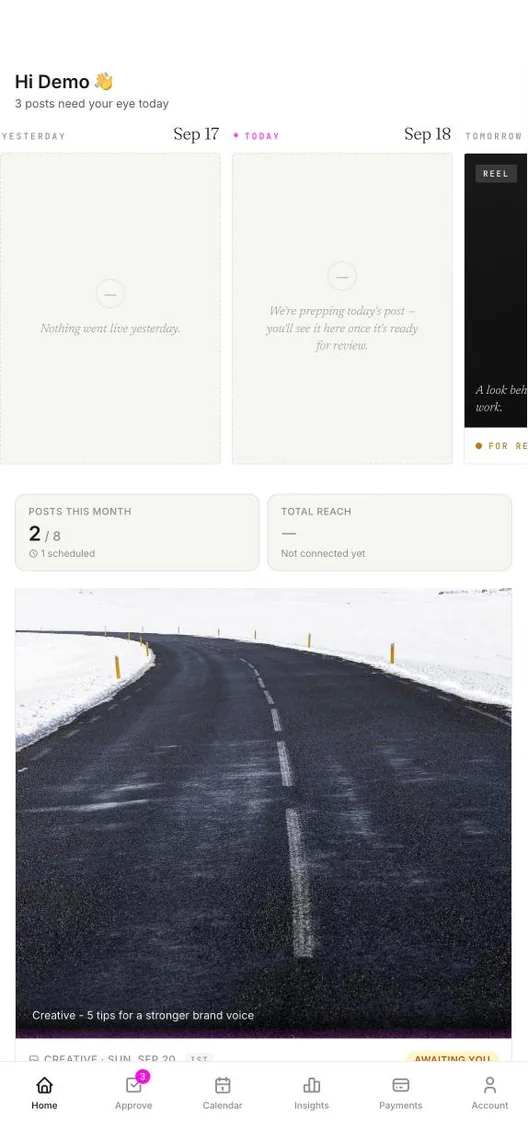
The client's home screen: today's posts and what is waiting for them.
How does one-tap approval work?
- Send the client their app onceShare the link. The client adds it to their home screen and it behaves like any other app, with push notifications.
- Your team sends a post for reviewWhen the reel, carousel or creative is ready, it moves to client review. The client gets a notification and the post appears on their Approve tab.
- The client approves or asks for changesOne tap on Approve. Or Request changes, with quick chips like "Change copy", "Fix design" or "Reschedule" to start the note. They can attach images to a comment, and select several pending posts to approve together.
- The post moves on by itselfYour team is notified straight away. If you have switched on auto-publish on approval and the brand's Instagram or Facebook is connected, the post is scheduled for its planned date and time. See the Instagram scheduler for how publishing works.
When a post goes back for changes, the next version keeps its revision round, so the client can open the version history and compare what changed. Our own write-up of the approval workflow we use covers how we set the statuses up.
Does my client need to download an app from the Play Store?
No. The client app is a PWA (progressive web app). The client opens your link in Chrome or Safari, taps "Add to Home Screen", and from then on it opens full-screen from their phone's home screen like a native app. The app walks iPhone users through the Share, Add to Home Screen step, because Safari hides it. There is no store review, no update to push, and nothing for a busy brand owner to search for. We explain the trade-offs in PWA vs native app for client portals.
Approvals on WhatsApp vs a client approval app
| WhatsApp approvals | My Digital Sevak client app | |
|---|---|---|
| Proof of who approved what | Buried in chat, often an emoji | Saved on the post, with name and time |
| Revision notes | Mixed in with everything else | On the post, with images and version history |
| Seeing the month ahead | Ask the agency | Calendar tab, always up to date |
| Approve ten posts at once | Ten replies | Select all, one tap |
| Paying the invoice | Bank details pasted in chat | Pay in the app via Razorpay |
WhatsApp still has its place for quick conversation. We compare the two properly in WhatsApp vs a client portal, and share what made our own approvals faster in how to get faster client approvals.
Built for how Indian brands actually work
- Several people per brand. The owner and the marketing manager can each have their own login on the same brand.
- One login for several brands. A client who owns two cafés or two hotels signs in once and switches between them inside the app.
- Payments in the same place. Clients see their GST invoices and pay by UPI, card, net banking or wallet through Razorpay, including part-payments. Billing itself is covered on the GST invoicing page.
- Notifications they control. Clients choose per device whether to get approval, payment and general alerts.
Behind the client app sits the rest of the workspace: the content calendar, team tasks and WhatsApp reminders for your team. When a client approves, the right person on your side sees it in their team workspace. For the bigger picture, read what agency management software covers or browse all features.
Frequently asked questions
What is a client approval app for agencies?
It is a mobile app your agency gives each client so they can review posts before they go live. Instead of screenshots on WhatsApp, the client opens their app, sees the reel or creative with its caption and date, and taps Approve or Request changes. Every decision is saved against the post.
Do clients need to download an app from the Play Store or App Store?
No. The client app is a PWA. Your client opens the link you send and adds it to their home screen, and it then opens full-screen like a native app, with push notifications. There is no store listing to wait for and nothing heavy to download.
Can more than one person from the brand approve posts?
Yes. You can add several people from the brand's side, such as the owner and a marketing manager, each with their own login. Someone who runs more than one brand signs in once and switches between brands inside the app instead of juggling separate accounts.
What happens after a client approves a post?
Your team is notified straight away and the post moves forward on the content calendar. If you switch on auto-publish on approval and the brand's Instagram or Facebook is connected, the approved post is scheduled for its planned date and time and publishes without anyone logging in.
Can clients pay invoices in the same app?
Yes. Invoices appear in the client's Payments tab, where they can view the full GST invoice and pay through Razorpay by UPI, card, net banking or wallet. They can also pay part of an amount, and the balance stays visible to both sides.
How much does the client approval app cost?
The client app is part of My Digital Sevak, not a separate add-on. Plans start at ₹999 a month for up to 10 clients, with Growth at ₹1,499 and Agency at ₹2,499. Your clients never pay anything, and every plan has a 7-day money-back guarantee.
Stop chasing approvals on WhatsApp.
Give every client their own app and get a clear yes or no on every post. From ₹999/month, with a 7-day money-back guarantee.