At three clients you can run an agency from memory. You know which brand has a Saturday offer, which owner approves only after 10 PM, and which designer is on the bakery reel. At ten clients, memory stops working. Somewhere around brand number eight, a post goes out a day late, a caption gets the wrong phone number, or a client asks "what's going up this week?" and nobody can answer without scrolling three WhatsApp groups.
I've run social media for 63+ brands from a small office in Rudrapur. The usual advice for managing multiple accounts is fine: use one dashboard, schedule ahead, don't reuse passwords. Agorapulse, Buffer and others cover that well. What they don't give you is the operating system: what happens on which day, who owns what, and how you know by 10 AM that nothing is about to slip. That's this post.
What breaks first when you go from 3 clients to 10+?
It's rarely the content. It's the coordination around it. In roughly the order I've seen them fail:
- Approvals. Ten owners approving in ten WhatsApp chats means you can't see who's holding up what. A post "approved" by a thumbs-up emoji is hard to find three weeks later.
- Deadlines. Teams plan by posting date, but the work happens days earlier. When making day and posting day aren't separate, every post is due "today".
- Files. Final designs live in personal downloads folders, so the version that goes live isn't always the version the client approved.
- Access. Client passwords travel over chat, and one person leaving means changing logins for twelve brands.
- Wrong-account posting. Switching between client accounts on one phone at 7 PM is how a gym's offer ends up on a jeweller's page.
Every fix below targets one of these five.
What does a weekly system for 10+ clients look like?
The trick is that every client runs on the same week. You don't run a separate process per brand; you run one process that every brand passes through. This is close to our schedule (we work Monday to Saturday, Sunday off):
| Day | What happens | Who |
|---|---|---|
| Monday | Review last week: what went live, what slipped, which approvals are stuck. Assign the week's production by making day, not posting day. | Account manager |
| Tuesday–Thursday | Production. Designers and editors work to making-day deadlines, usually two days before each post's posting date. | Designers, editors |
| Daily, by noon | Finished posts go to clients for approval with the caption, in one place, not as scattered WhatsApp images. | Account manager |
| Daily, evening | Approved posts are scheduled. Anything not approved by its cut-off gets one reminder, then the client is asked whether to move it. | Account manager |
| Friday | A two-line update to every client: what went live this week, what needs their approval next week. | Account manager |
| Saturday | Plan ahead: shoots, festival posts and anything for the next two weeks that needs client input. | Founder / strategist |
Monthly, on top of this: one day to plan next month's calendar for every client (we batch a month of content at a time), and one day for monthly reports. No production on Sundays or office holidays. We plan around them, rather than finding out on the day.
How do you keep each client separate?
Ten brands means ten tones of voice, ten logo files and ten "never say this" lists. Keep each client in one place:
- One brief per client, written at onboarding and kept up to date: voice, audience, offers, words to avoid, who approves. When a new designer picks up the brand, this is page one. Our client onboarding guide has the questions.
- One folder per client, same structure for all. Graphics, reels and carousels in fixed subfolders, files named by brand and posting date. We wrote up our exact Google Drive folder structure.
- One calendar per client, which the client can see. Not a master spreadsheet that only your team understands.
Account access is the part people get wrong. Don't collect passwords. Meta lets a business share its Facebook Page, Instagram account and ad account with an agency's own business portfolio, with chosen permissions, and take that access back at any time. See Meta's agency partner access guidance. The client keeps ownership; you never hold their login. As Vendasta puts it about shared passwords: if one client's password is compromised, everyone's is. More on this in auto-posting to Instagram without sharing passwords.
The three lists to check every morning
With 10+ clients, you can't open every brand every day. You check three lists across all of them, and they tell you where to look:
- Waiting on client: posts sent for approval and not answered, oldest first. Anything older than a day gets a nudge.
- Due today and late, by person, not by client. A designer with four posts due and two late is the bottleneck for four brands.
- Going live in the next 48 hours without approval. These are tomorrow's emergencies.
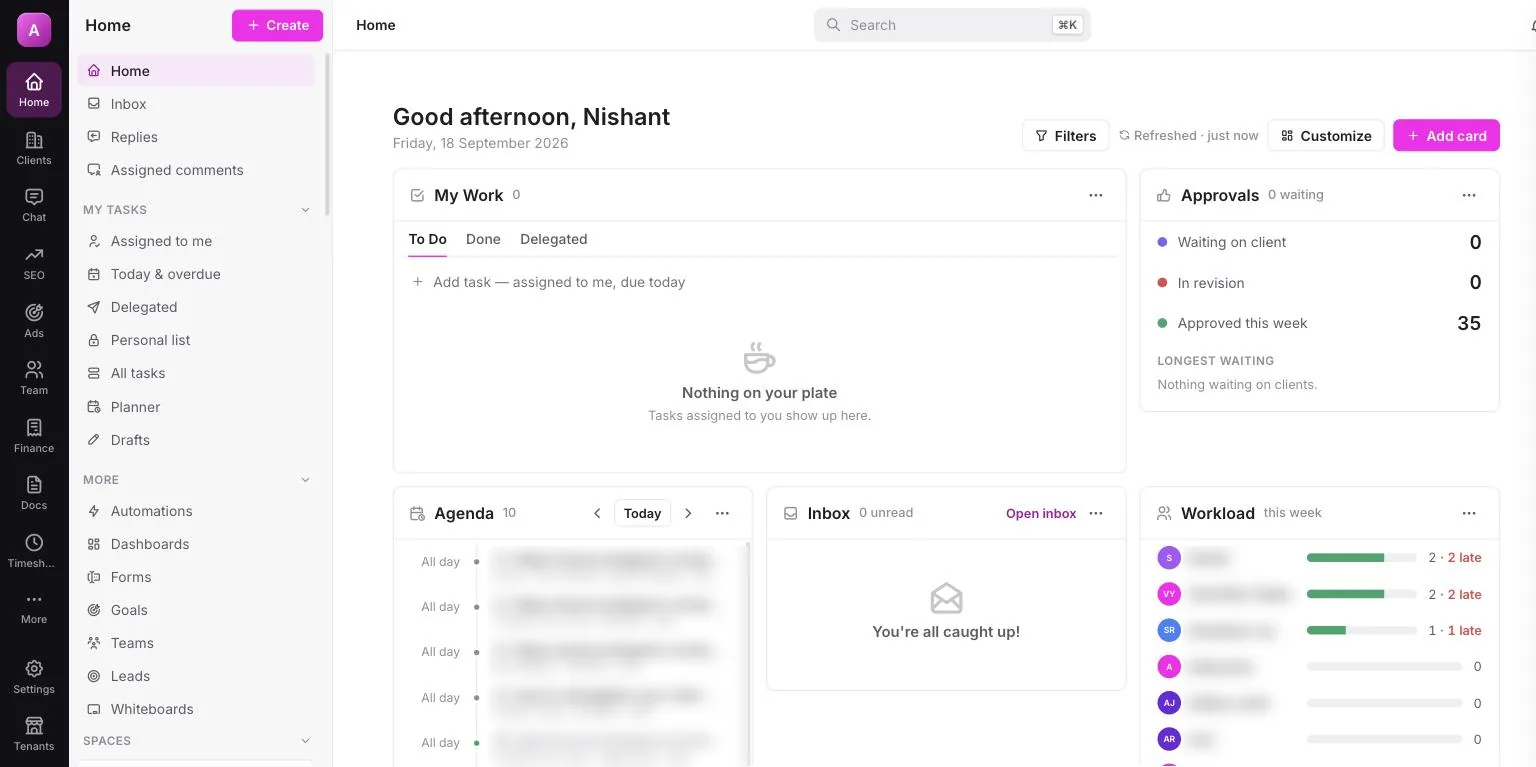
If those three lists are empty, the day is under control and you can spend it on strategy, pitching or a client call. If they're long, that's your morning.
How often should you talk to each client?
Not equally. Tier your clients by retainer size and how much hand-holding they need:
- Tier A (your top two or three): a fixed weekly 15-minute call or voice note, plus the monthly report walk-through.
- Tier B (most clients): the Friday written update and the monthly report. A call only when something changes.
- Tier C (small, stable retainers): the Friday update and the monthly report, emailed or shared in their portal.
Set working hours with clients at kickoff, too. "Approvals sent by noon, posts scheduled by 7 PM, no changes after 9 PM" is a perfectly normal thing to agree on. And if one client keeps breaking every rule, read when to let a client go.
Mistakes that cost us clients (so you don't repeat them)
- One person owns everything for a brand. When they're on leave, the brand stops. Every client needs a named backup.
- Approvals by phone call. Nobody remembers what was agreed. If it isn't written down next to the post, it wasn't approved.
- Taking on client 11 before fixing client 10's process. Growth multiplies whatever system you have, including a broken one. Our guide on how many clients one manager can handle has the capacity maths.
- Posting manually "just this once". Most wrong-account and wrong-version posts we've seen came from a rushed manual post.
How we run this in My Digital Sevak
We built My Digital Sevak around this week because we were running it on spreadsheets and WhatsApp. Every post is a task with a maker, a making date and a posting date. Clients approve or comment in their own approval portal on their phone, and approved posts auto-publish to Instagram and Facebook from the scheduler. The team gets WhatsApp reminders before work is due (once you connect a WhatsApp Business provider), and the morning lists above are cards on the Home screen. It won't replace your brief or your judgement. It just stops you from managing ten brands out of your head.
Frequently asked questions
How many social media clients can one person manage?
It depends on posts per client, platforms and how much client communication each brand needs, not on a fixed number. A manager who only plans and coordinates, with designers and editors doing production, can run far more brands than one person doing everything. Count weekly hours per client, then add a coordination buffer.
Should every client get a weekly call?
No. Most small-business clients want a short written update, not a meeting. Give your top-tier clients a fixed weekly slot, send everyone else a two-line Friday note on what went live and what needs their approval, and save calls for the monthly report review or anything going wrong.
How do I avoid posting to the wrong client's account?
Stop posting by hand from personal phones. Schedule every post from a tool where each post belongs to one client and one connected account, publish only what that client approved, and never switch between client logins in the same native app. Most wrong-account posts happen during manual, last-minute posting.
What tools do I need to manage multiple social media clients?
At minimum: one content calendar per client, an approval path that isn't a WhatsApp group, a scheduler connected to each client's accounts, shared storage with a fixed folder structure, and a task list showing who owes what today. One workspace that does all five saves the most switching.
Sources checked on 25 November 2026: Meta's agency partner access guidance, and the multi-account guides from Agorapulse, Buffer and Vendasta linked above. The weekly schedule is our own agency's.
Ten brands, one week, one screen
Plan every client's calendar, collect approvals in a client portal, auto-publish approved posts and see who's late, all in one agency workspace built in India. From ₹999/month. Try it free for 3 days, no card needed, with a 7-day money-back guarantee.