Short answer: Client management software for a digital marketing agency keeps everything about one client on one screen: brief, brand kit, scope, content calendar, approvals, logins, contract, invoices and reports. A CRM tracks the deal until it's won. Client management software runs the account after signing, so nobody has to ask "where is this client's stuff?" again.
Every agency founder knows this Monday-morning call. The client wants to know three things: did we get approval on the festive reel, was last month's invoice sent with the TDS line, and can someone share the Meta access with their new marketing manager. The answers sit in a WhatsApp group, a fourteen-tab Google Sheet, Gmail, a designer's phone and your memory. You say "let me check and call you back", and lose a little of the client's confidence.
That is the problem this software exists to solve. Most pages ranking for it are vendor roundups of twelve project tools, and they skip the real question: where does everything about this one client live?
Disclosure up front: we build agency management software, and I'll describe how we solved this for our own agency. The checklist below works whichever tool you choose.
What is client management software for a digital marketing agency?
It's the system that holds the full working record of each client after they sign, and the monthly cycle you run for them: plan, make, approve, publish, report, invoice, repeat. Not the sales pipeline. Not just a task board. The record.
The test I use is simple. Open one client. Can anyone on your team answer any question about that client in under a minute, without messaging a colleague? What did we promise them this month, what's approved, what's pending, who holds their logins, what did they sign, what do they owe, and how did last month perform? If the answer is "it depends who you ask", you don't have client management software. You have a collection of places.
Why isn't a CRM enough for an agency?
AgencyAnalytics puts it plainly in its agency client management guide: "once a client signs on, most CRM software stops being useful for the day-to-day work of actually serving that client." I agree, and I'd go further. A CRM's core object is a deal, which ends. An agency's core object is a retainer, which repeats every month with a delivery obligation attached. Pipeline stages can't model "October calendar 60% approved, two reels in revision, invoice paid minus TDS."
So keep a light CRM for leads; we covered which one in the best CRM for a social media agency in India. And don't expect a generic project tool to fill the gap either. ClickUp or Asana see your team's tasks, but not the client's side of the work: approvals, logins, invoices, reports. That trade-off is in our project management software comparison.
What should one client's screen actually hold?
Here's the list we ended up with after years of losing things, and where each item usually hides.
| Item | The question it answers | Where it usually hides |
|---|---|---|
| Brief and onboarding answers | What does this brand sell, to whom, in what voice? | A Google Form response nobody can find |
| Brand kit | Which pink is their pink? Which logo file? | One designer's Downloads folder |
| Scope | Is the fourth reel this month extra? | The proposal PDF from March |
| Content calendar | What goes out on Thursday, and who's making it? | A sheet with fourteen tabs |
| Approvals | Did they say yes, and to which version? | A thumbs-up in a WhatsApp group |
| Credentials | Who has the logins, and are they current? | A pinned chat message |
| Contract | What did we actually sign, and from when? | An email attachment |
| Invoices and payments | What's paid, what's due, how much TDS? | Accounting software plus bank SMS alerts |
| Reports | What happened last month? | A PDF emailed once, never seen again |
In My Digital Sevak each client has one hub with tabs for exactly this: Overview (contacts, Drive folder, portal members, onboarding answers, credentials), Tasks, Brand (colours, logo, guidelines), Scope, Calendar, Billing, Reports, SOP & Playbook docs and SEO, plus a Project tab for website builds with a "Day 4 of 15" counter, milestones and payment gates.
Eight things to demand from client management software
- A scope that counts. Monthly deliverables written down as numbers (reels, creatives, carousels), with an out-of-scope badge when work goes past them. Scope creep arrives as "one small story, please", eleven times a month. A visible badge turns an awkward conversation into a factual one.
- Approvals in the client's own login, not WhatsApp. One-tap approve, "request changes" with a reason, and a version history (v2, v3) so nobody argues later about which caption was signed off. This is what our client approval app does; the wider argument is in why agencies need a client approval app. An honest limit of ours: everyone on a brand's portal gets the same permissions, and clients type their feedback (with up to six images) rather than leaving voice notes.
- Several logins per brand, one primary contact. Indian businesses rarely have one decision-maker; the owner, the marketing manager and the owner's son all want to see the posts. Give each a login with a title, and send invoices and reports to one primary contact.
- A credentials vault, not a pinned message. Encrypted, and only admins can reveal or copy. India's DPDP Rules list encryption and access controls among the minimum security safeguards (Rule 6) for personal data, and it's a sound standard for client logins too. Better still, take partner access instead of passwords wherever the platform allows; our client onboarding guide walks through it.
- Onboarding with stages and a signed contract. Form sent, form filled, contract sent, contract signed, onboarded, with an automatic reminder if a client sits at one stage for 48 hours. Ours sends the contract as a branded PDF for e-signature through Documenso (you need a Documenso account) and stores the signed copy on the client.
- Invoices that are tied to the client and correct for India. CGST plus SGST or IGST worked out from the client's state, GSTIN and SAC on the invoice, and TDS handled properly so the invoice shows the net you'll actually receive. Clients should be able to pay inside their portal. See our GST invoicing page and the explainer on TDS on digital marketing services. What we don't do: e-invoicing (IRN) or a Tally integration.
- Reports the client can open without asking. A monthly report that lives on the client record and in the client's portal, not one PDF lost in an inbox. More on what to put in it in monthly social media reports for clients.
- Visibility rules for your own team. Your designer needs the brand kit and the calendar, not the client's invoices. Admins and managers should see everything; a finance-only, read-only role lets your CA see invoices and exports without being able to change them.
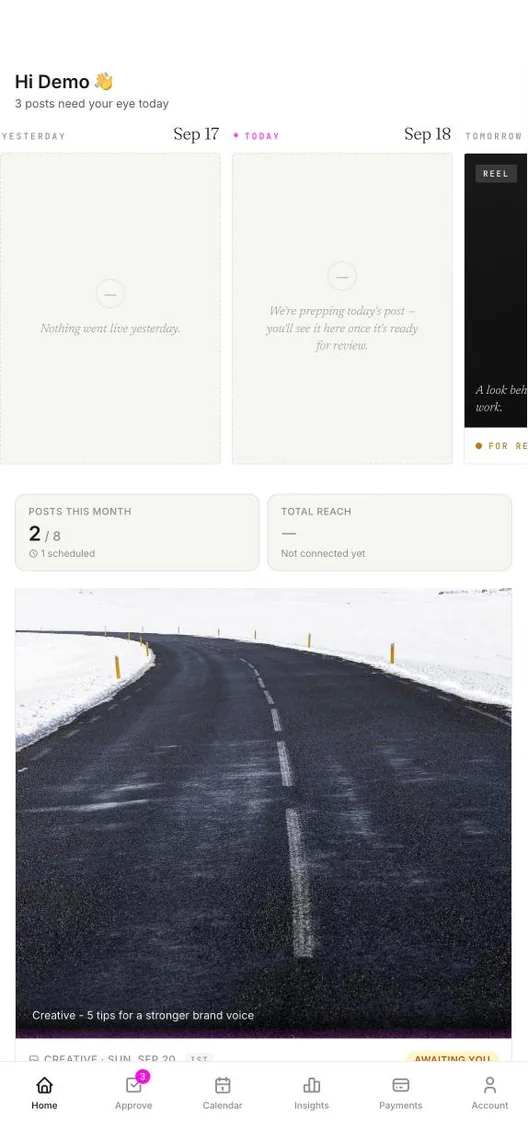
One screen per client, and one screen for all of them
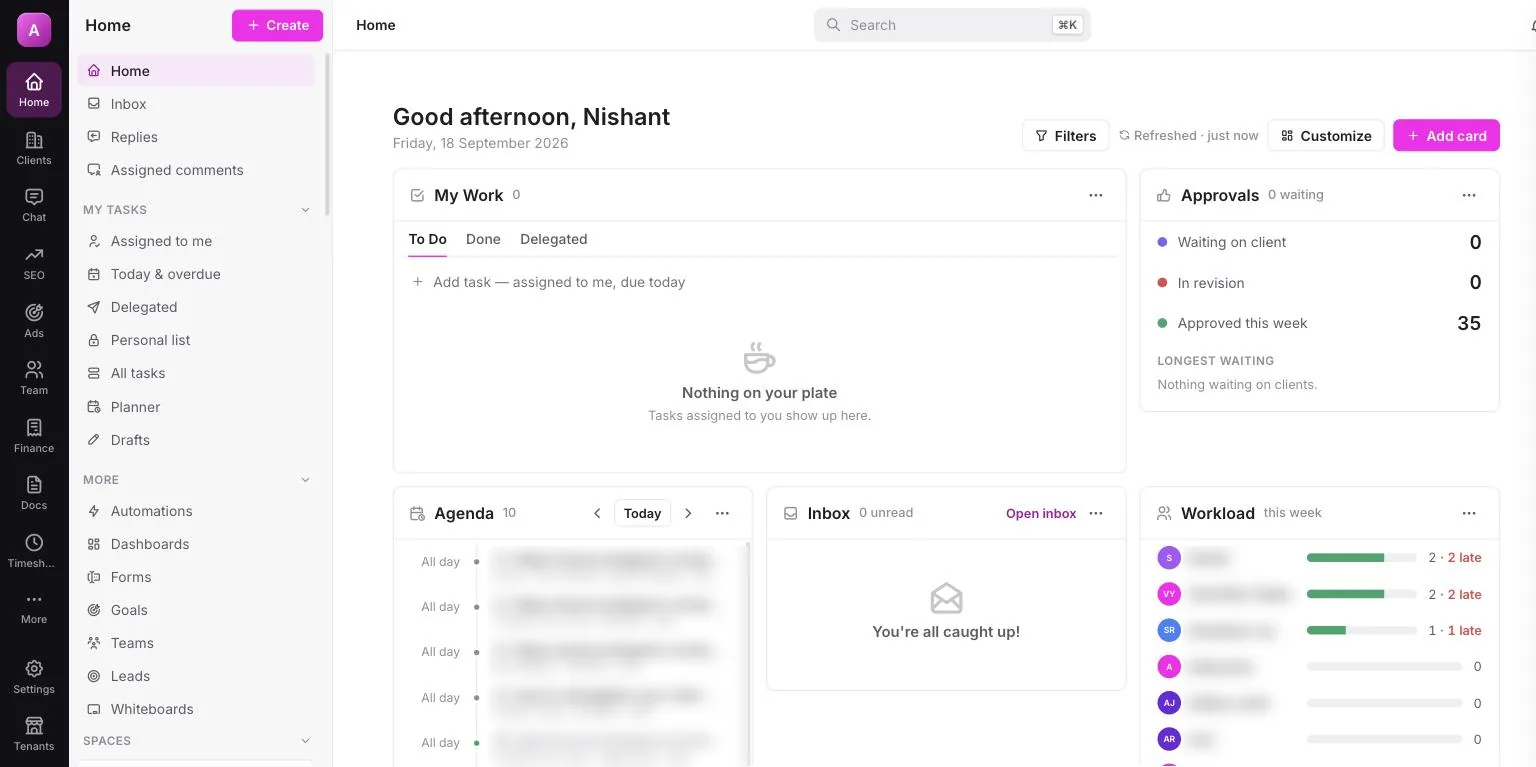
The client hub answers questions about one account. A founder also needs the cross-client view every morning: which approvals are stuck, which client hasn't been posted for, who owes money. In ours that's the Home dashboard, built from cards such as Approvals, Client health, Money due, Stuck work and Revisions requested.
Clients will still WhatsApp you, and that's fine. The point isn't banning WhatsApp. It's making WhatsApp the doorbell, not the filing cabinet: the chat says "check your approvals", and the record lives somewhere it can be found next month. We argued this out in WhatsApp vs a client portal.
How do you move existing clients in without stopping work?
- Start with your most difficult client, not your easiest. The account that generates the most "where is…" questions shows the payoff fastest.
- Day 1: fill the overview: contacts, Drive folder, onboarding answers. Move logins into the vault and delete the pinned messages.
- Day 2: brand kit and scope. Write the monthly deliverables as numbers.
- Day 3: import the current month's calendar from your sheet (a CSV import is fine) instead of retyping it.
- Day 4: invite the client's logins and send this week's posts through the portal. Tell them on WhatsApp, once.
- Day 5: raise the next invoice from the system so payment history starts building on the client record.
Then repeat, client by client.
When don't you need this?
If you're a freelancer with three clients, a folder per client and one well-kept sheet will do, and our freelancer-to-agency guide covers when that stops working. If you're a performance-only shop whose deliverable is an ad account, your record is the ad platform plus a reporting tool. Client management software pays off when you run monthly content for several brands with a team in between. That describes most social media agencies we meet, from Delhi NCR to Dehradun.
Frequently asked questions
What is the difference between a CRM and client management software for an agency?
A CRM manages the sales pipeline until a deal is won: leads, follow-ups, proposals. Client management software runs the account after signing: onboarding, scope, the monthly content calendar, client approvals, logins, invoices and reports. Most agencies need a light CRM for sales and proper client management software for delivery.
What features should client management software for a digital marketing agency have?
At minimum: one hub per client with brief and brand kit, a scope that counts monthly deliverables and flags extras, a content calendar, approvals in the client's own login with version history, an encrypted credentials vault, onboarding with a signed contract, GST-correct invoices, monthly reports and role-based visibility for staff.
Is it safe to keep client passwords in agency software?
Safer than a pinned WhatsApp message, if the software encrypts them and restricts who can reveal them. Prefer partner or admin access over passwords wherever the platform allows, such as Meta Business access. Keep the vault for the logins that genuinely have no access system, and remove access when a client leaves.
How much does client management software cost for an Indian agency?
Global tools usually charge per user in dollars, so the bill grows with every hire. My Digital Sevak is priced in rupees per agency: from ₹999 a month for 10 clients and 5 team members, with a 7-day money-back guarantee. Check each vendor's pricing page before deciding.
Every client on one screen
Brief, scope, calendar, approvals, logins, contracts, invoices and reports, in one login for the whole team. From ₹999/month, with a 7-day money-back guarantee.