What does an agency actually need from task management software?
We run a social media agency in Rudrapur, Uttarakhand, and we tried the usual route: ClickUp for the team, a scheduler for posting, WhatsApp for approvals, a spreadsheet for invoices. Each tool was fine. The gaps between them weren't — a post approved on WhatsApp that nobody moved to "Scheduled", a reel delivered but never billed.
An agency's work has two halves. The internal half is briefs, shoots, edits, revisions and deadlines. The client half is approvals, publishing, reports and invoices. ClickUp and Asana handle the first half well and stop there. My Digital Sevak puts both halves on the same record, so a post is one task from brief to approval to "Posted" to the invoice line.
Six views of the same work
Every unit of work — a reel, a carousel, a website milestone, a quick to-do — is a task, and you can look at it any way you like:
- List and Table for the daily run-through: filter by client, assignee, status or due date, edit inline, bulk-update, save the view.
- Board for production stages — briefed, in production, in review, sent.
- Calendar and Gantt for the month: drag a shoot day to a new date and every view updates.
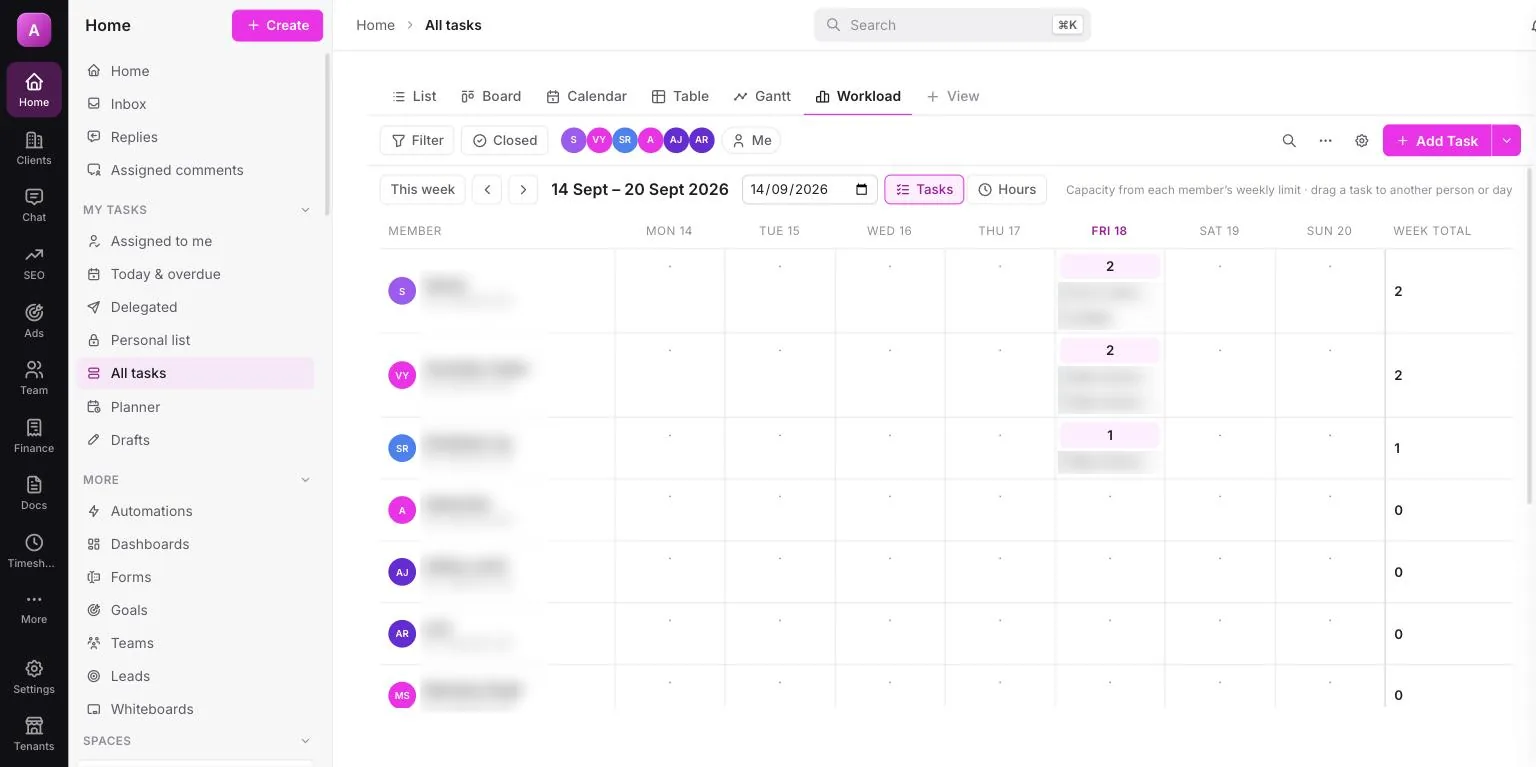
- Workload for fairness: each person's tasks or hours per day against their weekly capacity. Drag a task to someone with room.
Subtasks, checklists, dependencies and custom fields
Break a festive campaign into subtasks, give the designer a checklist ("logo safe area, Hindi copy checked, export 4:5"), and mark the edit as waiting on the shoot so nobody starts early. Add custom fields for whatever your agency tracks — platform, shoot location, ad budget. Recurring tasks handle the monthly report and the weekly content meeting, and task templates save you rebuilding the same checklist every month. Already on ClickUp or Asana? Export to CSV and import up to 2,000 rows at a time.
Automations that do the busywork
Rules are simple: a trigger, optional conditions, then actions. "When a post moves to Review, assign the account manager." "When a task is overdue, send the assignee a WhatsApp nudge." There are 20 ready-made agency templates to start from, a run log so you can see what fired, and inbound and outbound webhooks if you want to connect other tools. The WhatsApp side is covered on its own page: WhatsApp task reminders.
Docs, forms, goals and dashboards
Docs give every client a home for its brand SOP, playbook and meeting notes, with action items in the notes turning into tasks. Forms are shareable links that need no login — a shoot request or a content brief arrives as a task in the right client's list. Goals track targets — a number, a ₹ amount, or the share of matching tasks done, which updates itself — and dashboards show open, overdue and completed work by client or by person.
Team chat, clips and Google Calendar
Each client gets its own chat channel automatically, alongside DMs, group chats, threads and @mentions. Mentions and assigned comments land in one Inbox, so nothing hides in a group chat. When typing would take longer, record a screen or voice clip of up to five minutes, or dictate. Google Calendar syncs both ways: your meetings show in the Planner next to your timed tasks, and your tasks can show up in Google Calendar.
Why should client approvals and billing live in the same workspace?
Because the handoffs are where agencies lose time and money. In My Digital Sevak, when the client taps approve in their client approval app, the post's status changes for the whole team, and it can publish itself through the Instagram scheduler. Hours tracked in timesheets drop into the client's GST invoice. Nobody copies anything from one tool to another. That is the whole idea behind agency management software, as opposed to a general task tool.
How does it compare with ClickUp and Asana?
Honestly: ClickUp and Asana are excellent internal tools with far bigger integration marketplaces than ours. If your agency doesn't do social media, or you need a specific integration, they may suit you better. For a social media agency, these are the points that decide it:
| ClickUp | Asana | My Digital Sevak | |
|---|---|---|---|
| Task views, subtasks, dependencies | ✓ | ✓ (workload on higher tiers) | ✓ six views |
| How you pay | Per user, in USD | Per user, in USD | Flat plan in ₹, up to 5 / 15 / unlimited seats |
| Publishes to Instagram | ✗ | ✗ | ✓ reels, carousels, posts |
| Client approvals | Guest accounts | Proofing on Advanced tier | ✓ one tap in the brand's own app |
| GST invoice with TDS, UPI payment | ✗ | ✗ | ✓ via Razorpay |
| WhatsApp task reminders | Not built in | Not built in | ✓ on your own Business number |
The deeper write-ups, with each vendor's pricing sourced: ClickUp for social media agencies, Asana vs agency management software and the best agency project management software in 2026. If you're sizing the team, see how many clients one social media manager can handle.
Frequently asked questions
Is My Digital Sevak a good ClickUp alternative for agencies?
For a social media or digital marketing agency, yes. It covers the team side people use ClickUp for — task views, subtasks, dependencies, automations, docs, forms and chat — and adds what ClickUp leaves out: client approvals in a phone app, Instagram auto-publishing and GST invoicing, all on the same record.
Which task views does it have?
List, Board, Calendar, Table, Gantt and Workload. They are six views of the same tasks, so moving a card on the Board or dragging a bar on the Gantt updates it everywhere. Workload shows each person's tasks or hours per day against their weekly capacity, so you can see who is stretched.
Can I import my tasks from ClickUp or Asana?
Yes. Export your tasks to CSV from ClickUp, Asana, Trello, Excel or Google Sheets and import the file into any list — up to 2,000 rows at a time. Most agencies bring the open work across in an afternoon and start fresh with next month's calendar inside the workspace.
How much does it cost compared with ClickUp?
ClickUp and Asana charge per user, in dollars. My Digital Sevak is a flat plan in rupees: Starter ₹999/month for 10 clients and 5 seats, Growth ₹1,499 for 30 clients and 15 seats, Agency ₹2,499 unlimited. Every plan comes with a 7-day money-back guarantee.
Can my team see every task in the agency?
Only if their role allows it. Admins and managers see every task. Designers, editors and other staff see the tasks they are part of — assigned, created, mentioned in, or linked to their own work. Custom roles, permissions and two-factor sign-in are built in, so client data stays with the people working on it.
One workspace for the team and the client.
Tasks, approvals, publishing and GST billing on the same record. From ₹999/month, with a 7-day money-back guarantee. See all features.