Most onboarding forms I've seen from Indian agencies fall into one of two traps: a Google Form with eight vague questions ("Tell us about your brand"), or a 40-question US template that asks a sweet-shop owner in Haldwani for their "buyer persona". The first gives you nothing. The second never gets finished.
This is the form we actually send. Every question is on it because leaving it out once cost us a reshoot or a rewritten calendar. If you want the whole onboarding process around it (contract, access, first calendar), read how to onboard a new social media client. This post is only about the form.
What should go in the form, and what belongs on the call?
The most useful split I've learned: a form is for facts, a call is for judgement. If a question has one right answer the client can type, it goes in the form. If it needs a back-and-forth, it goes on the kickoff call, where you can hear the hesitation in their voice.
| Put it in the form | Keep it for the kickoff call |
|---|---|
| Business name, services, locations, hours | What "results" means to them in 90 days, and what you can honestly promise |
| Logo, colours, fonts, existing photos (as a Drive link) | Why the last agency didn't work out |
| Handles, page links, who is admin of the Meta account | Which content ideas excite them, and which make them uneasy |
| Competitors, brands they like, topics to avoid | How hands-on they want to be with approvals |
| Approver's name, backup, and best time to reach them | Budget for ads, if it's still undecided |
Sendible's popular social media questionnaire runs to more than 40 questions. That's a fine master list to pick from, but sending all of it is how forms die half-filled in a WhatsApp chat. Pick what unblocks your team's first two weeks and save the rest for the call.
The 25 questions
Copy these into whatever you use: Google Forms, Typeform, or your agency software. The small grey line under each is why we ask, and you don't need to show it to the client.
1. The business (5 questions)
- What is the business name exactly as it should appear in posts? (Spelling, capitals, and whether "Pvt Ltd" is used.)We once spelled a client's brand with an extra letter for a month because we copied it from their WhatsApp display name.
- What do you sell? Name the three products or services that bring in the most money.Content should push what pays, not what's easiest to photograph.
- Which cities or areas do you serve, and what are your opening hours?Needed for location tags, Google Business Profile posts and "visit us" captions.
- Why do customers choose you over the shop or brand next door? Write it the way a customer would say it.This replaces "What is your USP?", which nobody outside marketing can answer.
- What is one thing about the business that people are surprised to learn?The best first-month reels usually come from this answer.
2. Goals (4 questions)
- In three months, what would make you say "this is working"? Pick one: more enquiries, more walk-ins, more bookings, or more people knowing the name.One goal, so the report measures the right thing. We dig deeper on the call.
- How do enquiries reach you today: calls, WhatsApp, Instagram DMs, or walk-ins?Tells us where to send people in every caption and bio.
- Any launches, offers, events or price changes coming up in the next 90 days?The calendar gets planned around these, not discovered the week before.
- Which festivals and dates matter to your business, and which do you never post for?A jewellery brand and a CA firm have almost nothing in common here.
3. Brand voice and look (6 questions)
- Give three words for how your brand should sound. (For example: warm, expert, playful.)
- Which language should captions be in: English, Hindi, Hinglish, or a regional language? Paste one sentence you'd be happy to see.One real sentence beats any description of tone.
- Share two or three accounts (any industry) whose posts you like, and one you'd never want to look like.
- Upload or link your logo, brand colours and fonts. If you don't have a brand guide, say so.
- Where are your existing photos and videos? Share a Google Drive folder link.One folder link, not 40 images forwarded on WhatsApp.
- What should we never say or show? Topics, words, competitor names, prices, people, religious or political themes.The most important question on the form. More on this below.
4. Audience and competitors (3 questions)
- Describe your best customer in one or two lines: who they are, roughly how old, and where they live.
- What are the three questions customers ask most before they buy?Each one is a ready-made post, and answering them cuts sales calls.
- Name two or three competitors whose social media you watch.
5. Accounts and access (4 questions)
- Links to your Instagram, Facebook Page, YouTube and LinkedIn, plus your Google Business Profile if you have one.
- Is your Instagram a Business or Creator account, and is it linked to your Facebook Page? (Tick "not sure" if you don't know.)Scheduling tools can only publish to professional accounts linked to a Page.
- Who is the admin of your Meta business account (formerly Business Manager)? Name and phone number.That person adds us as a partner. We never ask for passwords; see why we post without them.
- Who manages your website, and do you want us to touch it?
6. Approvals and working together (3 questions)
- Who approves posts? One name, plus a backup for when they're travelling.Two equal approvers means two sets of contradictory feedback.
- When do you usually look at work: morning, during the day, or late at night? And who do we coordinate shoots with?Founder-run brands often approve at 11 PM. Plan for when they really look.
- Anything else we should know: a past bad experience, a sensitive topic, or something you're proud of?
Why is the "never say" question the most important one?
Because nobody volunteers it, and everyone remembers when you get it wrong. A premium resort we onboarded wrote in its form, in plain words: no discounts, no pressure to book, no comparisons. Our first draft of their monthly plan broke all three, with a "few cottages left" countdown and a comparison with city air quality. We caught it in internal review before the client saw it. The form had done its job. We hadn't.
The lesson changed our process more than the form: the answers are worthless if the person planning the calendar doesn't read them. Now the voice notes, the intro and the avoid list are the first thing the planner opens before writing a single post idea, and they feed into the brand's content pillars. If your form answers live in someone's email inbox, they're already forgotten.
How do you get clients to actually finish the form?
- Make it work on a phone. Most Indian founders will open your link on WhatsApp, not on a laptop.
- Show progress. Six screens of four questions feel shorter than one page of 25.
- Let them save and come back. A form that loses everything when they switch to a call won't get a second try.
- Give "I don't have this" as a real answer. No Google Business Profile? No brand guide? Better a known gap than a form stuck on one field.
- Never put passwords in a plain form. Login details are personal data, and a spreadsheet of them is a risk you don't need. Our DPDP Act guide for agencies explains why.
How we run the onboarding form in our own agency
We send this form from My Digital Sevak. Form templates are set up once in Settings, so a social media client, an SEO client and a website client each get their own questions. The client gets one email, signs in to their portal, and fills the form in short steps that save as they type. Password-type fields come with a "how to give us access" guide and an "I don't have this account" option, and anything they do enter is stored encrypted, visible only to admins.
When the form comes in, the answers sit on the client's page in the dashboard, where the planner reads them before the first calendar. The contract goes out for e-signature next, and if a client stalls on either step for two days, the system sends them a reminder so we don't have to.
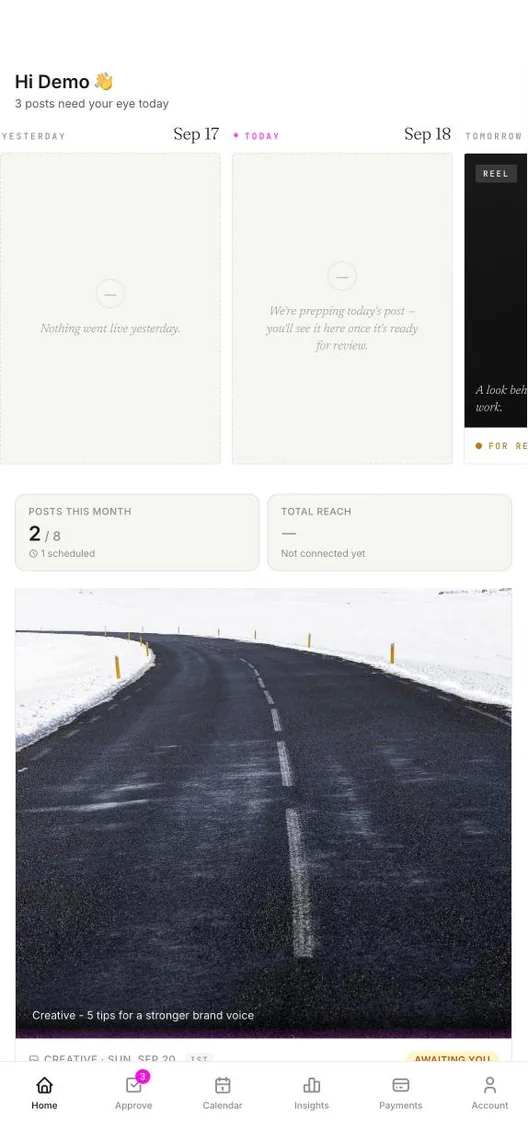
After onboarding, the client uses the same login to approve posts. Pair the form with the kickoff call in how to manage client expectations.
Frequently asked questions
How many questions should a social media client onboarding form have?
Around 20 to 25, split into five or six short screens. That is enough to start production without a second round of questions, and short enough that a busy founder finishes it in about 15 minutes. Anything that needs discussion, like goals and expectations, belongs on the kickoff call instead.
Can I use Google Forms for client onboarding?
Yes, for the questions themselves. A Google Form is free and works on a phone. Its weak spots are file uploads, saving a half-filled form, and storing anything sensitive. Never collect passwords in it. Ask for partner access to Meta accounts instead, and keep any unavoidable logins in an encrypted vault.
What should you not ask in a client onboarding form?
Don't ask anything the client already told you in the sales call or proposal, don't use marketing jargon like buyer persona or USP, and don't ask for Instagram or Facebook passwords. Each repeated or confusing question makes the form longer and the answers worse. Ask in plain words, the way the client talks.
Sources checked on 26 November 2026: Sendible's social media onboarding questionnaire (published 12 January 2026). The 25 questions are our own, from onboarding brands at our agency.
Send the form, the contract and the portal in one link
Onboarding form templates, encrypted access details, e-sign contracts and automatic reminders, in the same agency workspace as your calendars, approvals and invoices. From ₹999/month. Try it free for 3 days, no card needed, with a 7-day money-back guarantee.