Every agency owner has had this week. Clients are chasing, three posts are late, and you look across at your designers and wonder: are they slow, or am I giving them too much? Then you search for "how to track designer productivity" and land on time-tracking and monitoring tools, all promising to show you exactly where every minute went.
I run a social media agency with designers and video editors, and I've tried the minute-by-minute route. It told me a lot about minutes and nothing about whether the client was happy. What actually works for a creative team is simpler, fairer and harder to game: measure the work as it reaches the client.
Why are hours and screen activity the wrong measure for designers?
Because the most valuable part of a designer's day doesn't look like work. Finding the idea for a festival post, scrolling references, sketching three layouts and throwing two away: activity software reads that as idle time. Meanwhile, a designer resizing the same banner eight times looks very busy.
Even vendors who sell time trackers say this. Paymo's guide on measuring creative productivity calls "measured solely by output volume" a myth, and notes that hours worked or time per task "fail to capture the essence of creative efforts".
There's a second problem. Much of a designer's day isn't design at all. Asana's Anatomy of Work research has repeatedly found that people spend around 60% of their time on "work about work": chasing status, searching for files, switching apps. In an agency, that's the designer waiting for the client's logo, hunting for last month's brand fonts on WhatsApp, or asking which caption is final. If you measure hours, you're partly measuring how disorganised your process is.
What should you measure instead?
Five numbers, worked out per person per month. Here's how we define them:
| Number | How to work it out | What it tells you | What it misses |
|---|---|---|---|
| On-time handover | Work handed in by the end of its due day ÷ work due that month | Reliability, the thing clients feel most | Whether the due date was realistic |
| First-time approval | Finished posts never sent back for changes ÷ finished posts | Quality and understanding of the brief | Clients who send everything back by habit |
| Work finished | Assigned work completed ÷ assigned work | Whether the load is getting done | A carousel is harder than a quote card |
| Attendance | Days checked in ÷ working days (planned leave and holidays excluded) | Discipline and availability | Everything about the work itself |
| Manager rating | 1–5 stars for the month, with a one-line reason | Taste, initiative, attitude, the things numbers can't see | Can be biased, so keep it to one part of the score |
Two details matter more than they look. First, "handed in" means the day the designer submitted the work for review, not the day it was posted. If a post is made on Monday for a Friday posting date, the designer did their job on Monday. Mixing up the making day and the posting day is the most common way agencies punish designers for the client's slow approval. We go deeper on this in task management for a social media agency.
Second, only count work whose due date has passed. Otherwise the 3rd of the month looks like a disaster for everyone.
How much should each number count?
For designers and editors, we weight it like this, out of 100:
- On-time handover: 30
- First-time approval: 25
- Manager rating: 20
- Work finished: 15
- Attendance: 10
Reliability and quality carry more than half the score because those are what keep clients. Raw volume is deliberately low: weight it heavily and you'll get fast, forgettable posts. If a number has no data for someone (say, a part-timer who doesn't mark attendance), drop it and re-weight the rest rather than giving them zero.
How do you compare a reel editor with a static designer?
You don't compare them on raw counts. One person making 40 quote posts a month and another making 12 reels are both doing a full job. Two fixes:
- Use shares, not totals. All five numbers above are percentages of that person's own assigned work, so a reel editor isn't punished for making fewer pieces.
- Plan load in work units. When you assign work, count a static as 1, a carousel as 2–3, and a reel as 3–5 depending on the edit. Agree a fair monthly load in units with each person. This is a planning tool, not a score: it stops you overloading someone in the first place.
And separate the designer's revisions from the client's. A send-back because the logo was wrong is on the designer. A send-back because the client changed the offer after approving the plan is not. When you review first-time approval, look at the reasons. Our guide to handling client revisions covers how to cap the second kind.
A monthly review that doesn't feel like surveillance
Numbers only help if the team trusts them. This is the routine we follow:
- Tell the team what's measured before the month starts. The five numbers, the weights, and nothing hidden.
- Each person sees only their own card. No public league table. A designer and an account manager do different work, and ranking colleagues turns them into rivals.
- Run a trial month first. Show scores with nothing attached, so people can see the system is fair before it matters.
- Read the lowest number with the person. Low on-time is often a status habit (finished work never marked as handed in), not slow work.
- Fix one thing per month. Brief quality, asset folders, or deadline reminders. Not everything at once.
- Reward small and reliably. If you tie money to it, keep it modest and predictable. We explain our setup in the employee rewards program guide.
If you're tempted by screenshot software anyway, read why heavy monitoring backfires first. Monitoring measures whether the computer was busy, and it costs you trust you'll need during the next Diwali rush.
How we track it in our own agency
All five numbers come out of the team workspace in My Digital Sevak, because the inputs already live there: every post is a task with a due date, every hand-in and every send-back is recorded, and attendance is a one-tap check-in.
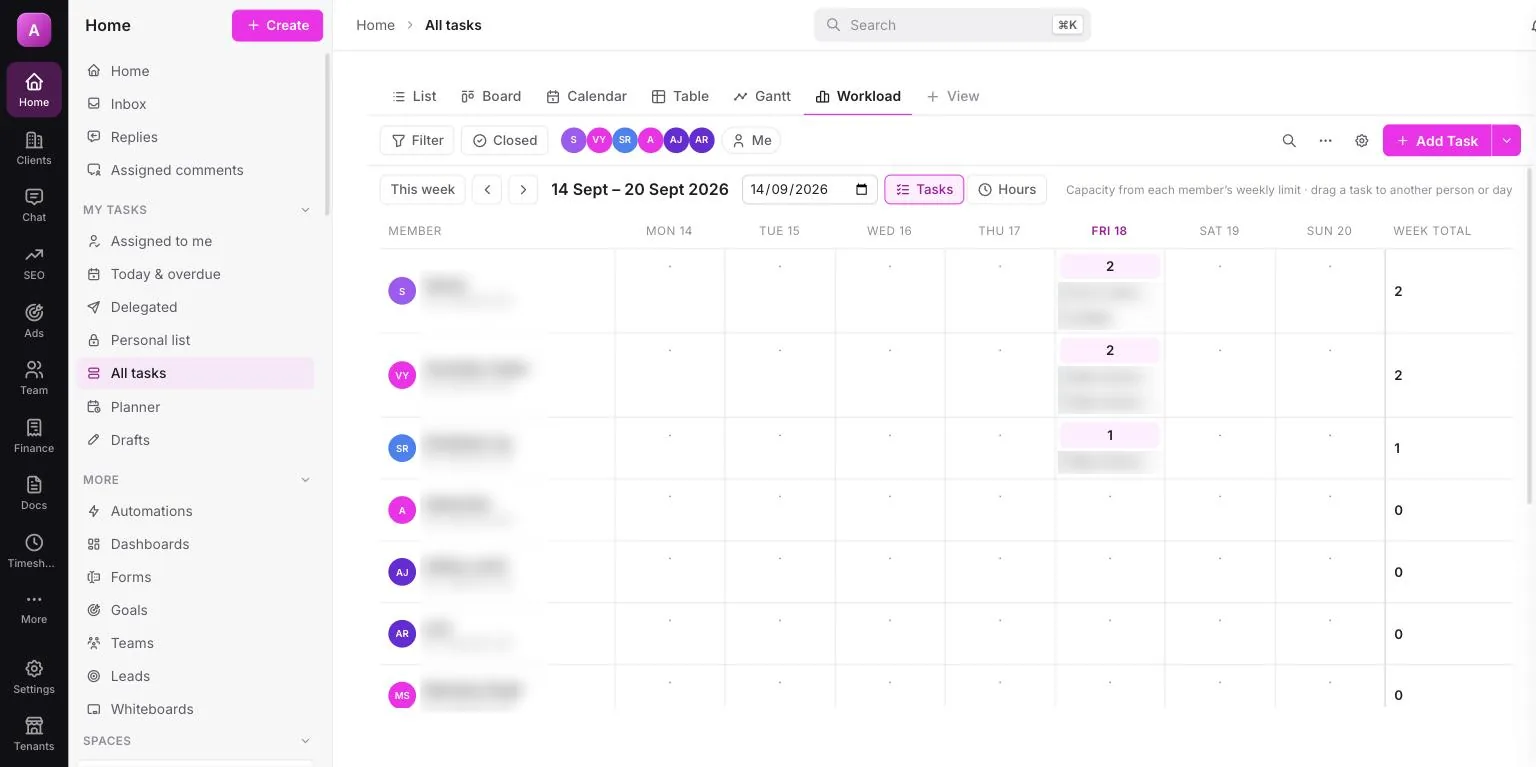
- During the month, the Workload view shows each person's tasks by day, so you can spot overload before it turns into late posts.
- On the 10th, each staff member gets a 0–100 monthly scorecard built from the five numbers, with the weights above for designers and editors. Admins review the cards first, add stars and a note, then release them.
- Each person sees only their own card, plus the Star of the Month.
- If you bill by the hour, timesheets record time per task for invoicing. That's for pricing, not for judging people. See tracking billable hours.
The honest limits: the scorecard is new (November 2026) and off until an admin turns it on. "Work finished" counts tasks, not weighted units, so the work-unit planning above is still a judgement call you make when assigning. It counts every send-back as a send-back, whatever the reason, so read it alongside the comments. And there's no screen or activity monitoring, by design.
Frequently asked questions
How do you measure a graphic designer's productivity?
Measure what the client receives, not the hours. Track the share of assigned work handed in by its due date, the share approved without being sent back, how much of the month's work got finished, and attendance, then add a manager's rating for quality. Review the numbers monthly, alongside the reasons behind them.
How many posts should a social media designer make in a day?
There is no fair single number, because a simple quote card and an eight-slide carousel are different jobs. Agree a daily load in work units with each designer, weighting carousels and reels higher than statics, and judge them on finishing what was agreed on time rather than on a raw post count.
Should I use time tracking or screen monitoring for designers?
Use time tracking if you bill clients by the hour or need to price jobs, because it tells you what work costs. Avoid screen monitoring for creative staff. Thinking, sketching and searching references look idle to activity software, and monitoring tends to lower trust and effort rather than raise them.
Sources checked on 25 November 2026: Paymo, "Is There a Way to Measure Productivity as Creatives?" (February 2025); Asana's Anatomy of Work research on "work about work". Weights and product details describe how we run My Digital Sevak as of November 2026.
See the work, not the mouse movements
Tasks with making-day due dates, a workload view, one-tap attendance and fair monthly scorecards, in the same agency workspace as your calendars, client approvals and invoices. From ₹999/month. Try it free for 3 days, no card needed, with a 7-day money-back guarantee.