In most small Indian offices, work from home isn't a policy. It's a series of exceptions. Heavy rain and the roads are flooded. A child is unwell. The power is out at the office but not at home. Someone is travelling back after Diwali and can edit on the train. The work still has to go out, and the owner still wants to know one thing: was this person actually working today?
Search for "work from home attendance tracking" and almost every result is an HR suite selling GPS check-in, geo-fencing, IP restrictions and selfie attendance. Those features are real and useful for field teams. But for a 10-person creative team, they answer the wrong question. I run a social media agency with designers and video editors, and the question I care about isn't where someone is sitting. It's whether today's reel will be ready.
What should you actually track when someone works from home?
Five things, and nothing more:
- Start of day. A check-in with a timestamp, same as in office. It sets the tone: the day has begun.
- Reachable hours. A window, say 10 AM to 6 PM, when a call or message gets answered within 30 minutes. This matters more than total hours.
- Output. Did today's tasks move? Draft shared, revision done, file uploaded, post sent for approval.
- End of day. A check-out, so you know when they stopped and nobody quietly works till midnight.
- Status. Full day, half day or leave, recorded in the same place as office days.
Notice what's missing: mouse movement, active-window time, screenshots every ten minutes. These measure activity, not work. A designer staring at a blank artboard for twenty minutes is working. A bot jiggling a mouse is not.
Check-in, location tracking, or monitoring software?
Here's how the common approaches compare for a small office:
| Approach | What it proves | Personal data collected | Trust cost | Fits |
|---|---|---|---|---|
| Simple check-in / check-out | The person says they started and stopped | Timestamps | Low | Small teams that already trust each other |
| IP-restricted or geo-fenced check-in | They checked in from an allowed network or place | IP address or location | Medium | Hybrid teams with fixed WFH locations, or a proxy problem |
| Selfie check-in | The right person checked in | Face photo | Medium–high | Field staff, sites, shifts |
| Screenshot / activity monitoring | The computer was in use | Screens, apps, sometimes keystrokes | High | Rarely right for creative work |
| Output-based (tasks) | Work actually moved | Work records you already keep | Low | Agencies, studios, any team with defined deliverables |
HR suites like Keka offer location-constrained WFH attendance, and that's the right tool if your team includes field staff or you're paying by the hour. For an office of designers, writers and editors, the first and last rows of the table do most of the job.
Why does heavy monitoring backfire?
It's tempting to think more tracking means more honesty. The research suggests the opposite. In 2022, a team of researchers wrote up two studies in Harvard Business Review: in a survey of more than 100 US employees, monitored staff were more likely to take unapproved breaks, ignore instructions and deliberately work slowly; in an experiment with 200 employees, people told they were being monitored were more likely to cheat. The authors' explanation is that surveillance makes people feel the monitor is responsible for their behaviour, not themselves. Monitored people who felt fairly treated cheated less.
There's an Indian legal angle too. Screenshots, location and face photos are personal data. Under the DPDP Act, collecting them comes with notice and consent duties. We explained what that means for small firms in our DPDP Act guide for agencies. The less you collect, the less you have to protect.
A WFH and hybrid attendance policy you can copy
This is close to what we use. Paste it into your SOP document and adjust the numbers:
- Ask first. A planned WFH day is requested a day ahead. A same-day WFH request (rain, illness at home, no power) goes in by 9:30 AM.
- Check in the same way. Mark attendance from home exactly as you would in office, by 10:30 AM.
- Be reachable. Answer calls and messages within 30 minutes between 10 AM and 6 PM. If you'll be away longer, say so first.
- Post the day's plan. Within the first hour, update your tasks so your manager can see what you'll finish today.
- Show the output. By end of day, each task is either done, sent for review, or has a note saying what's left.
- Check out. Punch out when you stop. Don't leave the day open.
- Half means half. Four working hours is a half day, at home or in office.
- Client-facing days stay in office. Shoots, client visits and launch days are office days unless the manager agrees otherwise.
Notice that rules 4 and 5 do the real work. A check-in tells you someone said they started. The task list tells you whether anything happened. If your team is already behind on deadlines, read how we remind the team of deadlines on WhatsApp, which matters even more when people aren't sitting together.
How we track WFH days in our own office
Attendance lives inside My Digital Sevak's team workspace, next to the tasks, which is why output-based tracking works for us. On a WFH day:
- The person opens the dashboard in their browser at home and taps Present or Half day on the Home banner. That punches them in with a timestamp, exactly as it does in office.
- Anyone who hasn't marked by 10:30 AM gets a reminder.
- Their day's tasks, and how many are late, are visible to the manager in the Workload view. That's the real check.
- They punch out when they stop. A day left open is closed automatically at 9 PM IST and labelled as auto-closed, so nobody mistakes it for a real 9 PM finish. A manager can also punch someone out on their behalf, and that's recorded.
- If someone can't work at all, the "I'm off" button marks the absence and creates a "Cover needed" task listing their work at risk.
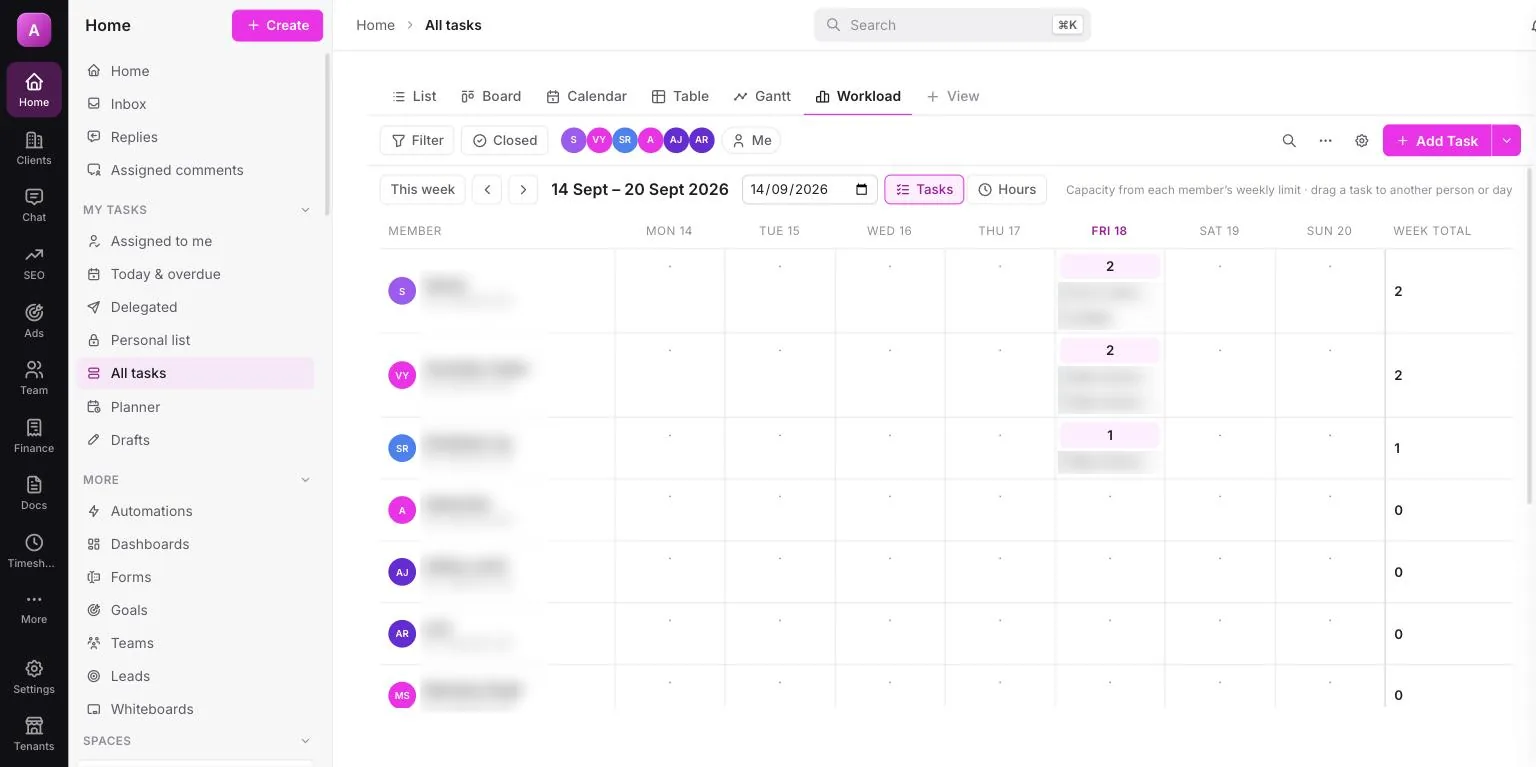
To be clear about the limits: there's no GPS, IP restriction, selfie or screenshot capture, and the app doesn't label a day as "WFH" versus "office". A home day is simply a present day. If you need a separate WFH count for policy or payroll, or you need to prove where someone checked in from, use a dedicated HR app. We compare the options in our attendance app guide for small offices.
Do the new labour codes change any of this?
India's four labour codes took effect on 21 November 2025, and the central rules that standardise formats for registers, including attendance, were notified in May 2026. States notify their own rules too. The short version for a small office: keep a reliable daily record for everyone, whether they work at home or in office, and ask your CA whether your state needs it in a specific register format. An app gives you a clean daily record; it isn't legal advice.
Frequently asked questions
How do you track attendance for employees working from home?
Ask for a check-in at the start of the day and a check-out at the end, agree the hours when they must be reachable, and judge the day by whether their tasks moved. For a small team this is enough. Add IP or location checks only if you have a real proxy-attendance problem.
Is it legal to monitor employees working from home in India?
Basic attendance records are normal and expected. Screenshots, location tracking or webcam capture collect far more personal data, which brings notice and consent duties under India's DPDP Act. Tell staff in writing exactly what you record and why, collect only what you need, and check specifics with your lawyer or CA.
Should a work-from-home day count as a full day of attendance?
Yes, if the person worked their agreed hours and was reachable. Mark it present like any office day. If they only worked half the day, mark a half day. Treating WFH as second-class attendance just pushes people to take leave instead of working from home when they're able to.
Sources checked on 25 November 2026: the monitoring studies as summarised by Arizona State University's W. P. Carey School (co-authors of the HBR article, June 2022); EY India on the labour codes' effective date; Business Standard on the May 2026 rules; Keka's remote-attendance product page. This is not legal advice.
Attendance that sits next to the work
One-tap check-in from office or home, auto-close at 9 PM, sudden-leave cover tasks and a workload view that shows whether the day's work moved, in the same agency workspace as your tasks, approvals and invoices. From ₹999/month. Try it free for 3 days, no card needed, with a 7-day money-back guarantee.