When I went back through a few months of revision rounds at our agency, the uncomfortable pattern was clear. Most of the "design changes" clients asked for weren't about design at all. The price on the creative was wrong. The offer ended on a different date. The Hindi line had a spelling the owner didn't like. The client wanted the phone number, not the website. None of that is the designer's fault. It's the brief's.
Most guides on this topic are written for a company hiring a freelancer for a one-off logo or campaign. An agency is different: you brief the same two or three designers 60 to 100 times a month, across brands that each have their own rules. So the brief has to be fast to write, impossible to misread, and the same shape every time. Here is the one we use.
What should a social media design brief include?
Seven fields. The example column is a real kind of post we make every October: a sweet shop's Diwali gift-box offer.
| Field | What to write | Example |
|---|---|---|
| Goal | The one action you want, in one line | Get gift-box orders on WhatsApp before 25 October |
| Message | The one thing a viewer should remember | Corporate Diwali boxes, ready in 48 hours |
| On-creative text | The final words, exactly as they should appear, already approved | Headline: "Diwali boxes for your whole team" · Sub: "From ₹499 a box · Min. 20 boxes" · WhatsApp 98XXX XXXXX |
| Format and size | Single image, carousel (how many slides) or reel cover, plus pixel size | Single image, 1080 × 1350, text inside the centre area |
| References | 1–2 links, each with what to borrow | Layout from link 1 (box on the left, text right); gold foil feel from link 2. Not the red background. |
| Brand rules | Logo position, colours, fonts, and anything the client has banned | Logo bottom-right; maroon and gold only; no "discount" or "sale" wording |
| Deadline and approver | When the designer must hand it in (not the posting date), and who signs off | Hand in Tue 6 PM for internal review; client approver: Mr. Agarwal |
Notice what's missing: adjectives. "Make it premium and eye-catching" is not a brief. Every designer thinks their work is premium and eye-catching. Agency-focused guides like ManyPixels' social media design brief make the same point: replace vague aims with a specific goal, and the design decisions follow from it.
Why is the on-creative text the part most briefs get wrong?
Because it's tempting to write "add some text about the Diwali offer" and let the designer fill it in. Then the designer writes a headline, guesses the price, picks a font size for a phone number nobody gave them, and the client "revises" the design three times when what they were really doing was writing the copy.
Our rule: the text on the creative is written and checked before the designer opens Canva or Photoshop. That means:
- Final prices with the ₹ sign, and whether they're "incl. GST" if the client cares. A wrong price on a live post is the costliest typo in this business.
- Hindi, Hinglish or regional lines typed out exactly, ideally by someone who reads the script. Designers shouldn't be translating.
- Dates written with the day ("Sat, 25 Oct"), so a wrong date is easier to catch.
- One contact method. Phone, WhatsApp or website. Not all three crammed into the corner.
- A word limit on the headline. Ours is about seven words. On a phone, anything longer becomes a paragraph.
The caption is a separate job. The brief only covers what goes on the image.
What size should you tell the designer to use?
Always give the pixel size, because "an Instagram post" isn't one size any more. In early 2025 Instagram switched profile grids from squares to taller rectangles, cropping each post's thumbnail to 3:4 (Social Media Today), and later started accepting 3:4 photos as a standard format (9to5Mac).
What that means in a brief:
- Feed post and carousel: 1080 × 1350 (4:5) is still the safe default. Keep the headline, price and logo away from the top and bottom edges, so nothing important is cut off when the grid shows it at 3:4.
- Carousels: same size on every slide, and say how many slides. The first slide's job is the hook, the last slide's job is the action.
- Reel covers and stories: 1080 × 1920, with the text in the middle, clear of the caption and buttons that sit on top.
- File type: JPG or PNG for upload, plus the editable file saved in the brand's folder (we keep ours in a fixed Google Drive folder structure).
How do you give references without getting a copy?
A reference with no note is an instruction to copy it. Five references with no notes is an instruction to guess. Give one or two, and write one line under each: "take the layout", "take the type style", "take the photo crop". Then add one thing you don't want, especially a style the client has already rejected. That single "not this" line has saved us more rounds than any mood board.
Old posts from the same brand are often the best reference of all. If last month's festive post got approved in one go, link it and say "same family, new offer".
A copyable brief template
Paste this into your task, chat or sheet and fill it in. If any line is empty, the brief isn't ready.
Brand / post: ______ · Posting date: ______
Goal (one action): ______
One message: ______
Text on the creative (final): Headline ______ · Sub-line ______ · Price / date ______ · Contact ______
Format: single / carousel (__ slides) / reel cover · Size: ______
Reference 1: link ______ → take the ______
Reference 2: link ______ → take the ______
Not this: ______
Brand rules: logo ______ · colours ______ · banned words / themes ______
Hand in by: ______ (day + time) · Approver: ______
Five brief mistakes that cause revision rounds
- Briefing with the posting date as the deadline. If the post goes live Saturday, the designer's deadline is two or three days earlier, after leaving time for your review and the client's.
- Changing the brief on WhatsApp. A voice note saying "make the price ₹549" never reaches the file. Update the brief itself, then tell the designer.
- Hiding the brand rules in someone's head. If only the account manager knows the client hates pink, the designer will find out on round two.
- Mixing two goals. "Promote the gift boxes and also our new café" makes a post that does neither.
- Passing on client feedback word for word. "Make it pop" is not an instruction. Translate it into a change the designer can make, as we explain in how to handle client revisions.
Set the deadline after you've checked the designer's week
A perfect brief still fails if it lands on a designer who already has eleven posts due on Friday. Before you set "hand in by", look at what's already on their plate. In our agency we plan each post with two dates: the posting date the client sees, and the making day the designer works to, which comes a few days earlier. Then we check the team's week before assigning.
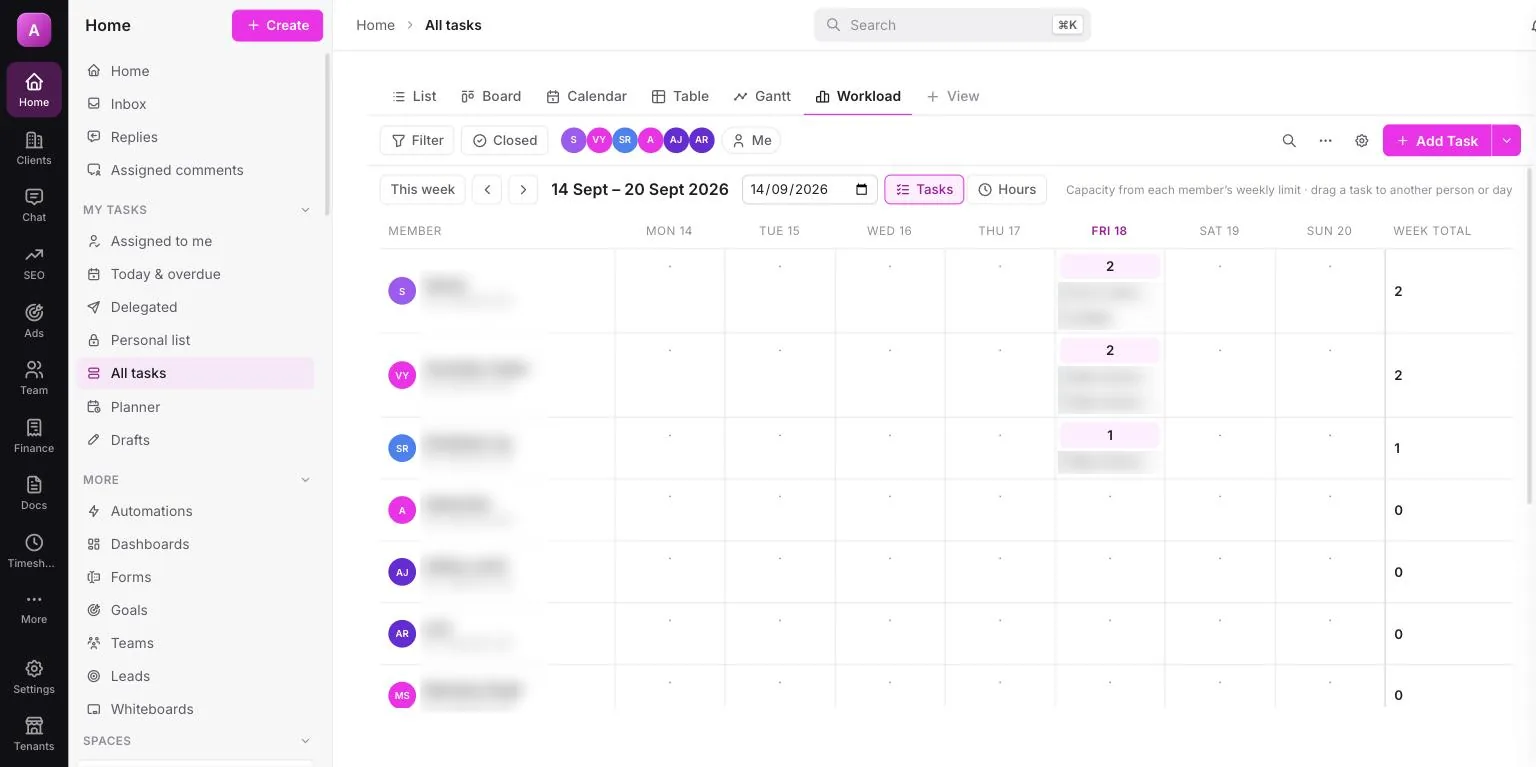
If one designer is overloaded every week, that isn't a briefing problem. Our piece on tracking designer productivity covers how to spot it without micromanaging.
How we brief designers inside our own agency
We moved our briefs out of WhatsApp and into My Digital Sevak, because a brief buried in a chat between memes and voice notes is a brief nobody re-reads. Every post is a task, and the task's description is the brief. Reference links sit at the very top of the task, above everything else. Under "Notes for the team" there's a Designer box for layout, colours and style, and separate boxes for the video editor and the shoot.
The brand's guide opens with one click from the post itself, so the designer doesn't have to ask which shade of maroon. When a designer opens their task, they see their deadline first, then the brief and their file. Posting details are one line at the bottom, because those aren't their job. If the client asks for changes, the designer sees a "What to change — the client asked" box with the client's comments, not a forwarded screenshot.
Designers also get WhatsApp reminders before a task is due, not after it's missed. That matters for teams spread across cities: whether your designers sit in the same room or work remotely from Dehradun, the brief and the deadline live in the same place. If you're setting this up from scratch, start with our guide to task management for a social media agency.
Frequently asked questions
How long should a design brief for one social media post be?
Short enough to read in a minute: usually 8 to 10 lines. It needs the goal, the exact text for the creative, the format and size, one or two references with what to borrow, brand rules, the deadline and the approver. A long brief full of adjectives is worse than a short one with final copy.
Should the graphic designer write the text on the post?
No. The strategist or copywriter writes the final on-creative text and puts it in the brief, already approved. Designers should decide hierarchy and layout, not the offer wording, the price or the spelling of a Hindi line. When the designer invents copy, the client corrects copy, and it looks like a design revision.
How many references should I give a graphic designer?
One or two, and say exactly what to take from each: the layout from one, the colour treatment or type style from another. Five references with no notes give the designer five directions and no decision. Always add one example of what you don't want, especially if the client has rejected a style before.
Sources checked on 26 November 2026: ManyPixels on social media design briefs; Social Media Today on Instagram's vertical profile grid (January 2025); 9to5Mac on Instagram's 3:4 photo format (29 May 2025). The brief template and the revision patterns are from our own agency.
Put the brief, the deadline and the file in one task
Briefs, reference links, designer notes, the brand guide, client changes and WhatsApp reminders, in the same agency workspace as your calendars, approvals and invoices. From ₹999/month. Try it free for 3 days, no card needed, with a 7-day money-back guarantee.