For years, I was my agency's reminder system. At 3 PM I'd message the video editor, "Bhai, reel ka kya hua?", for something due at 5. It worked. But it meant every deadline depended on me remembering to chase it, and the one I forgot was always the one that slipped. When we grew past a handful of brands, I wasn't managing the work any more. I was managing my own memory.
This guide covers the three ways Indian teams actually do this: by hand, with the tools inside WhatsApp itself, and fully automatic. It also covers the part most guides skip: what a reminder should say, and when it should land, so it gets work done instead of getting muted.
Why remind your team on WhatsApp instead of email or an app?
Because that's where your team already is. In most small Indian agencies, the designer and the editor have WhatsApp open all day and check email twice a week. App notifications from a project tool get swiped away with forty others. A WhatsApp message from a name they know gets read.
The trap is the opposite problem. When every reminder, file, client complaint and lunch order shares one group, the group gets muted and nothing in it gets read. So the goal isn't "more WhatsApp". It's the right message, to the right person, once, at the right time.
Method 1: Reminding by hand
For a team of three or four, manual reminders are fine if you're disciplined about them:
- Post a morning lineup. One message in the team group at 9:30 AM: each person's name, their tasks for the day, and the time each is due. This replaces a dozen separate follow-ups.
- Message the person, not the group. "@Priya, Diwali reel due at 4" in a group of twelve is noise for eleven people. A direct message is a reminder.
- Ask for "done" in one place. Decide where completion gets reported, either the lineup thread or the task sheet, and stick to it.
The cost is your time, and the fact that it stops on the days you're on a shoot, at a client meeting or unwell. That's the real limit of manual reminders: they're only as reliable as the person sending them.
Method 2: Can WhatsApp itself send reminders to your team?
Partly, and it's worth knowing exactly where the limits are before you build a habit around them.
| WhatsApp feature | What it does | Why it isn't a team deadline reminder |
|---|---|---|
| Remind me (on a message) | Long-press any message and set a reminder, from preset times or a custom one | Only you get the alert. MacRumors' walkthrough confirms the person who set it is the only one notified |
| Events in groups | Create an event with a date and time inside a group chat | Built for meetings and shoots, not for a list of tasks with different owners. Rolled out from 2024 |
| Scheduled calls | Schedule a group call; attendees get a reminder before it starts | Useful for the Monday review call, not for task deadlines |
| Scheduled messages | Pick a time for a message to send | Reported in development in 2026. Even where it appears, you still type each message yourself, and it doesn't know when a task moves or finishes |
The pattern is clear. WhatsApp's own tools help you remember. None of them know about your tasks, so none of them can remind someone else when a due date arrives, skip a task that's already done, or move when a deadline shifts.
Method 3: Automatic reminders before every deadline
Automation means the reminder is attached to the task, not to your memory. When the task has an owner and a due time, a message goes out before it's due. If someone finishes early, nothing is sent. If the client pushes the deadline, the reminder moves with it.
There are two honest ways to get there:
- Connector route. Your existing task tool, plus an automation service like Zapier, plus a WhatsApp messaging provider. Zapier has templates that send WhatsApp reminders for scheduled tasks. It works, but it's three subscriptions and someone has to fix it when one link breaks.
- Built-in route. A task tool that sends WhatsApp reminders itself, so there's nothing to wire up beyond connecting your number once.
Either way, use the official WhatsApp Business Platform, not a tool that drives an ordinary WhatsApp account through WhatsApp Web. That's unofficial automation of a personal-style account, and a number that gets flagged for it can be banned. On the official platform, reminders are pre-approved "utility" templates. Meta charges per delivered message: Indian press reports from October 2026 put the utility rate at about ₹0.115 plus GST. Rough sum for an eight-person team getting four reminders each working day: about 830 messages a month, under ₹100 plus GST at that rate. The message fee is not what makes this expensive. Setting it up badly is.
What should a deadline reminder on WhatsApp say?
A reminder someone can act on without opening anything else. Ours have four parts: who it's for, what the task is, when it's due, and one tap to close it.
✓ Mark as done · Open task
What to leave out: "Reminder!!!", "urgent" on everything, and paragraphs of context that belong in the task itself. If every message is urgent, none of them are.
When should it go out?
| Type of work | When to remind |
|---|---|
| Same-day design or edit with a set time | 2 hours before |
| Task due on a date, no time | Morning of the due date, around 9:30 AM |
| Shoot, launch or anything before 10 AM | Evening before, around 6 PM |
| Client approval chase | Not a team reminder: send it to the client through your approval process |
| Overdue task | One nudge, then a conversation with a person, not more messages |
The etiquette that keeps reminders from being muted
- One reminder per task. Repeating the same message every hour teaches people to ignore you.
- Quiet hours. Agree a window, for example 9 PM to 8 AM, and hold anything that falls inside it. A reminder at 11 PM reads as pressure, not help.
- A daily cap. If someone is getting fifteen reminders a day, the problem is their workload, not their memory.
- Let people opt out, and keep the same reminder in the app so nothing is lost.
That third point matters most. Reminders fix the "forgot" problem, not the "too much work" problem. If deadlines keep slipping even with reminders, check how many brands each person carries; our guide on how many clients one social media manager can handle has the numbers, and writing your process down as agency SOPs fixes the rest.
How we do it in My Digital Sevak
We built this because I was tired of being the reminder. In My Digital Sevak, WhatsApp task reminders are part of the task. You connect your own WhatsApp Business number once, through the official platform, and add each person's number. After that, everyone assigned to an open task gets one WhatsApp before it's due: anywhere from 15 minutes to 24 hours ahead (two hours by default), on the morning of the due date for tasks without a time, plus an optional message at 6 PM the evening before.
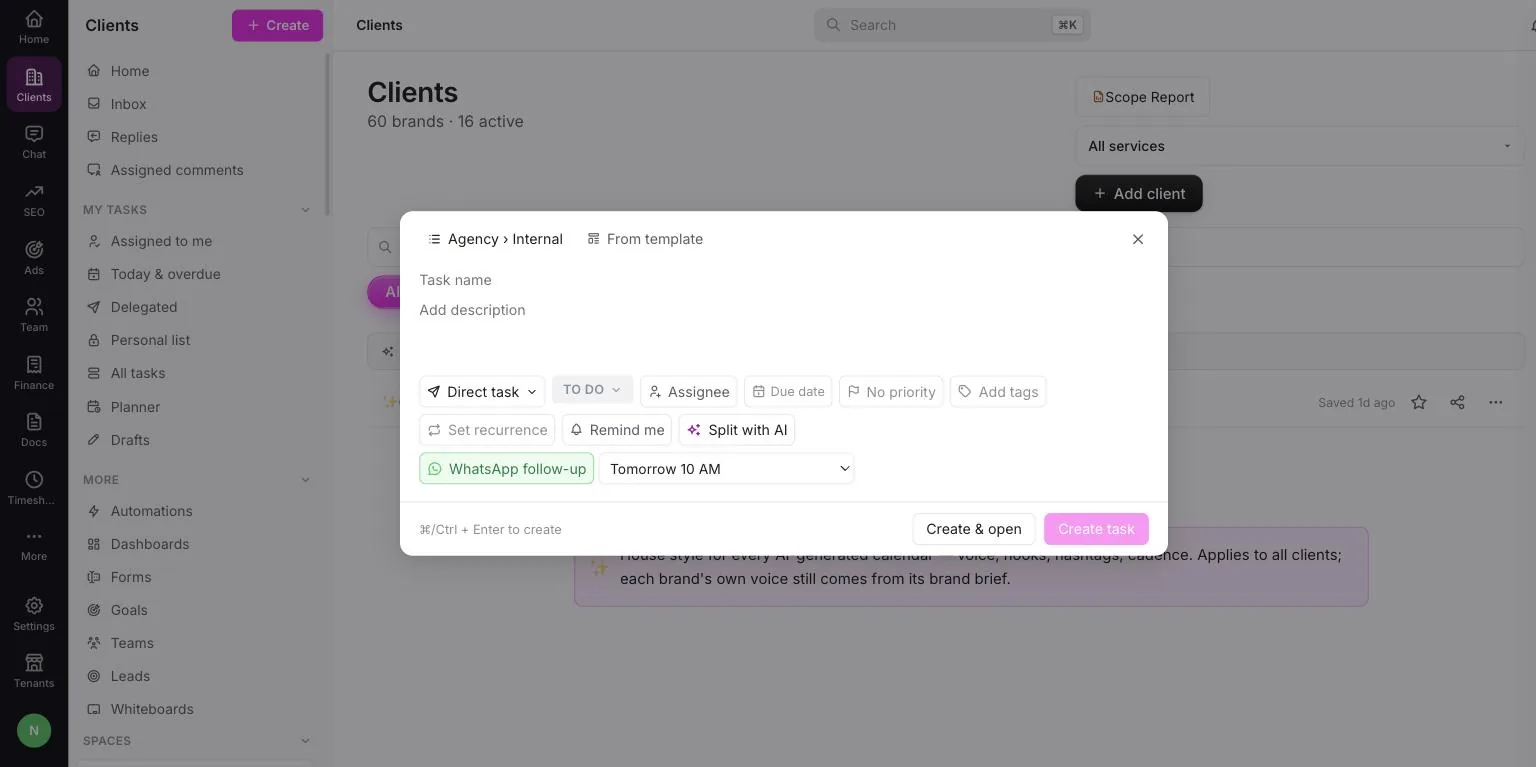
The message carries a one-tap Mark as done link, no login needed, and the task closes on your board. Finished tasks are skipped, moved deadlines move the reminder, and quiet hours, a daily cap and per-person opt-out are built in. The person who assigned the work can get a WhatsApp when it's done, so nobody has to ask "ho gaya?". You can also add a follow-up to any single task, or an automation rule like "when a task is overdue, WhatsApp the assignee". It all sits in the same task system as your content calendar and the Instagram scheduler. WhatsApp reminders start on the Growth plan at ₹1,499/month, whether your team is five people in Dehradun or twenty in a metro.
Frequently asked questions
Can WhatsApp send automatic reminders to a team?
Not on its own. The Remind me option only alerts the person who set it, and group events are built for meetings, not task deadlines. Automatic reminders to other people need the official WhatsApp Business Platform, connected to the tool where your tasks and due dates live, so each message goes out on time without anyone typing it.
How long before a deadline should a reminder go out?
Long enough to act, short enough to stay in mind. Two hours works for most same-day design and editing work. For a task due on a date with no time, send it on the morning of that day. Shoots, launches and anything early in the morning need an extra reminder the evening before.
Is it okay to send deadline reminders to the team on WhatsApp at night?
Avoid it. A reminder at 11 PM reads as pressure, not help, and people who mute work chats at night miss it anyway. Agree quiet hours with the team, for example 9 PM to 8 AM, and hold anything that falls inside them until the morning. Move a genuinely early deadline to the evening before instead.
Stop being your team's reminder system
Every task gets its own WhatsApp before it's due, from your own business number, and closes with one tap. Same workspace as your calendar, client approvals and GST invoices. From ₹999/month. Try it free for 3 days, no card needed, with a 7-day money-back guarantee.